
Start with what the number describes
Imagine a payment method shows a large user figure. Before using it in a market presentation, you need to know who is counted, where those people are, and which period the value covers. Registered accounts, users active during a year and users active in one month can all produce plausible numbers. They answer different questions.
In Aurato, a measurement attaches a value to a subject and metric rather than treating the value as a free-standing fact. The unit, period and geographic context give it meaning. The same method can therefore have different measurements in different markets, alongside a broader view of its activity. Begin with the question you are trying to answer, then find the measurement whose definition and scope actually match it.
Read the definition, unit, period and scope together
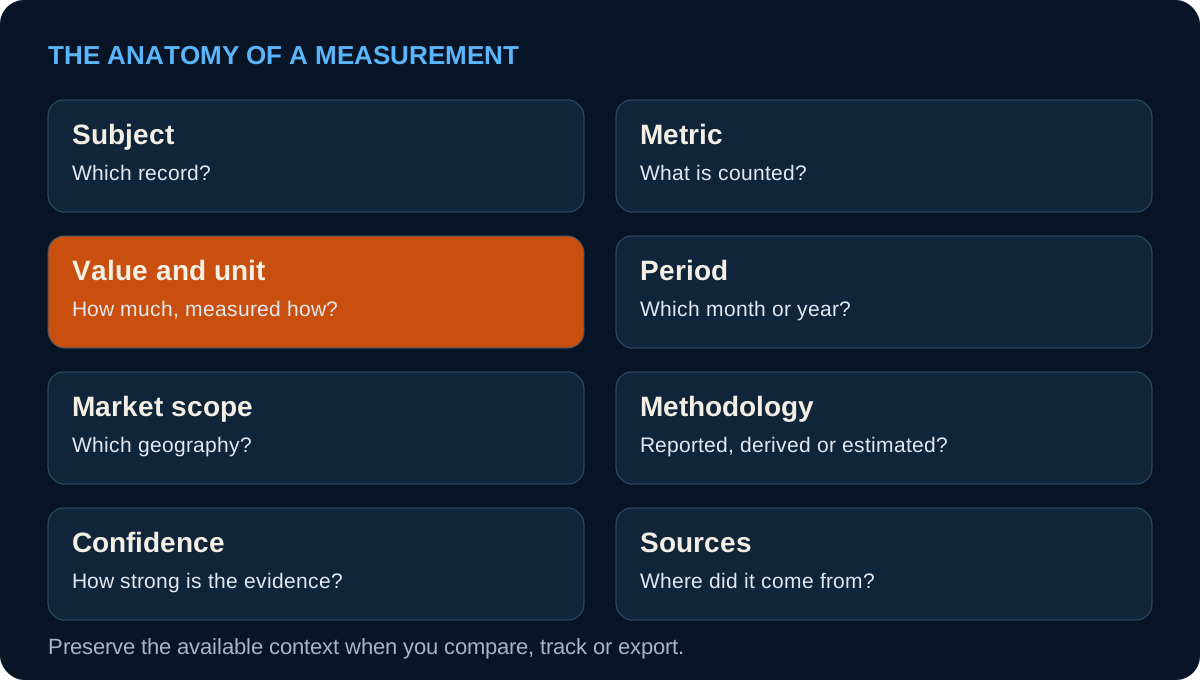
The metric tells you what is counted. Transactions concerns payment events; TPV concerns their monetary value; users concerns a stated population. The unit distinguishes a count from a percentage, a monetary total or a ratio such as cards per adult. The period tells you whether a value belongs to a calendar month, a year or another reporting basis. The subject and market context identify what the observation covers.
Use Help → Definitions when a label leaves room for interpretation. Some distinctions are easy to miss. Banks per 100K refers to commercial-bank branches per 100,000 adults, not the number of banking companies. Debit cards per adult counts cards in circulation relative to the adult population, not the share of residents holding at least one card. Understanding the denominator changes the question you can answer with the value.
Keep monthly and annual activity separate
Monthly active users describes people active in the stated calendar month and market. Aurato’s annual market-scoped Users estimates have a different basis: residents active at least once in the trailing twelve months. Other reported user figures retain the population defined by their source. Do not assume that every appearance of the word “users” describes the same window or population.
The distinction also applies to transactions and TPV. A monthly observation is not a full-year total, and multiplying the latest month by twelve produces an annualized estimate rather than an observed annual result. Monthly charts and annual scheme statistics should be read within their own periods. If a chart and a headline appear to disagree, first check their time basis before treating the difference as a data error.
Distinguish local activity from the available market total
A method’s activity in the Netherlands is different from its activity across all measured markets. A market page can show the former while a method overview or Deepdive combines the published market observations available for its view. A linked-market count describes geographic coverage in the Graph; the number of measured markets describes where a particular series has usable observations.
This matters over time. If more markets enter a series, its total can change because coverage expanded as well as because payment activity grew. Deepdive identifies measured-market coverage and can leave breaks in the line when that coverage changes. Its year-over-year comparison requires matching markets. Users of different methods can also overlap: adding two methods’ active-user counts does not establish a unique population of people using digital payments.
Understand how a measurement was produced
Published evidence does not always supply a number in exactly the form a research question needs. A measurement can be reported directly, calculated from published inputs, estimated, or based on a combination of reported and estimated information. Where provided, the method and methodology explain that route. The original source may establish the total while another source helps explain a local allocation or population.
Confidence describes Aurato’s assessment of the evidence and assumptions behind an estimate. It is not a statistical probability that the displayed value is exactly correct. Read it alongside the method, period and supporting material. A recent update can incorporate a better source or revise an assumption without representing a sudden real-world change in payment behavior. That is a reason to inspect the revision, rather than treating every new value as fresh growth.
Follow the evidence and keep the dates straight
On the record page, use the Graph section’s Show all sources control to find the evidence associated with that subject. The Sources view gives you a route to the original reports and pages; their definitions and footnotes may explain what a total includes. Measurement-specific methodology and source information, where available, narrow that evidence further. The Sources guide explains how to move between a record and its publications.
A measurement period, a publisher’s release date and an Aurato update date are separate dates. A report released this month can describe last year’s payments. An Aurato revision today may correct an older observation. Retain the period of the value in your analysis, and use Changes when you need to understand what Aurato added or revised. A newer page timestamp alone is not evidence of a newer reporting period.
Star the measurement you want to follow
Following a number should not require saving a screenshot and checking it manually. On an Atlas record, look for the star beside an available headline measurement. Select it while signed in to add that metric to Favorites. The record star and the metric star are separate controls: one follows the subject, while the other follows an individual measurement associated with it.
For a concrete first example, open a market you research regularly and star its GDP or Population headline. Then open Hub → Dashboard → Favorites and choose Metrics. Your saved item identifies the record and the metric; a context is identified where one is attached to the saved item. Save only the indicators you expect to revisit, so the list remains a useful review queue rather than another catalog to search.
- Choose one headline measurement
Open an Atlas market and find the star beside GDP or Population.
- Save the measurement
Select the metric star while signed in; the record star is a separate favorite.
- Return to Metrics in Favorites
Open Hub → Dashboard → Favorites and select Metrics to find the saved indicator.
- Review the next published value
Read its value and period in Updates, open the record to investigate, then mark the entry seen.
Review a new value without losing its context
Favorites includes an Updates section for the items you follow. A Metric value entry identifies the measurement, displays the published value and period, and includes its context where one is attached. Open the entry’s subject to inspect the current record. If the update matters to your analysis, check whether it is a later period, a revision to existing evidence, or a change in the coverage or assumptions behind the figure.
Use the check control to mark an update as read once you have reviewed it. Mark all as seen clears the unread state across your update queue. Read entries remain available until you remove them; removing an update leaves its measurement favorite in place. You can also use Refresh to reload the list. This is an in-site research workflow: the fact that a measurement is starred does not mean a separate email alert has been configured.
Carry a usable observation into your next analysis
Before putting a value in a chart or comparison, retain enough information to recognize it later: subject, metric, unit, period, market scope and the relevant evidence. A compact value on screen is a display convention, not the original precision of the observation. A dash or unavailable value is a coverage gap; it should remain missing rather than becoming a zero in a spreadsheet.
For a market review, this produces a practical sequence: inspect the definition, check the period and scope, follow the source, star the measurement if you will need it again, then review later updates in Favorites. Use Dashboard Compare for a second subject, Workbench for a dataset or custom chart, or Graph when an application needs structured measurements. The number stays useful because its meaning travels with it.